Restaurant Inventory Software: The Best Picks for 2026
 R. Fennel, Forcked.comNovember 19, 2026 · 2,003 words

Restaurant inventory software promises to find the money hiding in your walk-in. Usually it is a case of lemons nobody counted, or a supplier who nudged chicken thighs up 40 cents. Here is what each system costs, what it really does, and which one fits your kitchen.
TL;DR

- Best overall: MarketMan, recipe costing and POS sync from $249/m.
- Best free option: Aposal, a free POS with inventory, reports and a kitchen display.
- Best for invoices: MarginEdge, unlimited invoice processing at $350/location/m.
1. What does restaurant inventory software do?

Restaurant inventory software joins up three numbers most kitchens keep in three different places: what you bought, what you sold and what is still on the shelf. When they agree, food cost behaves. When they don’t, the gap is waste, theft or a portion nobody weighed.
These are the jobs it does:
The report that earns the subscription is actual versus theoretical. It turns “food cost feels high” into “we used six more cases of chicken than we sold”. One is a mood. The other is a conversation with the line.
Waste usually hides in a few items. Alamo Drafthouse found, using Crunchtime, that its top 10 products made up 60% of its waste. Fix those ten and the rest of the list matters far less.
Check whether a system tracks ingredients or only finished items. Square says it plainly: its basic inventory tracks only finished goods. Sell a burger and nothing deducts the bun, patty or cheese. For a kitchen that cooks from scratch, that tells you very little.
2. What does restaurant inventory software cost?

Prices are monthly, in U.S. dollars, for one location:
| Software | $USD/m | Includes |
|---|---|---|
 MarketMan Starter |
$249 | Recipes, counts, 50 scans/m |
 Aposal |
$0, Pro $9 | Free POS with inventory, reports, KDS |
| MarketMan Growth |
$299 | Unlimited scans, smart ordering |
| MarketMan Enterprise |
$449+ | Advanced reports, email scans |
 MarginEdge |
$350 | Unlimited invoices, recipes, bill pay |
 R365 |
Est. $400–500 | Inventory + accounting |
 Toast xtraCHEF Pro |
POS $69+, Est. $150–250 | Invoices, recipes, inventory |
 Lightspeed Starter |
$69 + add-on | Inventory as an add-on |
| Lightspeed Essential |
$189 | Advanced inventory incl. |
 Square Plus |
$49 | Item inventory, close-of-day reports |
| Square Restaurant Inventory |
Plus + Est. $139 | Ingredients, POs, menu costing |
 TouchBistro Inventory |
POS $69+, Est. $50–100 | Inventory add-on |
 Crunchtime |
Est. $300+ | AI forecasts, voice counts |
 Craftable |
Est. $300+ | Invoice AI, recipe costing |
Prices as of November 2026, from MarketMan, Aposal, MarginEdge, Toast, Lightspeed, Square and TouchBistro. Restaurant365 (R365), Crunchtime, Craftable and the Toast, Square and TouchBistro add-ons are sold by quote, so their figures are our estimates from comparable published prices.
What each plan unlocks matters more than the headline price:
| Feature | Plan or Extra |
|---|---|
| MarketMan recipe costing, counts, POS sync |
All plans |
| Aposal inventory, reports, KDS |
Free plan |
| MarketMan smart ordering, unlimited scans |
Growth, Enterprise |
| MarginEdge Freepour liquor scale |
$150/m extra |
| MarginEdge SmartPrep |
$95/m extra |
| R365 inventory, recipes, purchasing |
Quoted package |
| Toast recipe costing, inventory |
xtraCHEF Pro |
| Lightspeed advanced inventory |
Essential, Premium; extra on Starter |
| Square ingredient tracking |
Plus or Premium + Restaurant Inventory |
| TouchBistro inventory |
Quoted add-on |
| Crunchtime forecasting, voice counts |
Quoted |
| Craftable invoice AI, barcode counts |
Quoted |
3. When does inventory software pay for itself?

Vendors promise a lot. Craftable claims a 2–5% average cut in food and beverage cost, and Crunchtime says 3–5%. You need far less than that. The useful question is how small a cut covers the bill.
This hypothetical example shows the drop in food cost, in percentage points of sales, each subscription needs to break even:
| Software | $50k Sales/m | $100k Sales/m |
|---|---|---|
| MarketMan Starter |
0.50 pts | 0.25 pts |
| Aposal |
0 pts | 0 pts |
| MarginEdge |
0.70 pts | 0.35 pts |
| Lightspeed Essential over Starter |
0.24 pts | 0.12 pts |
| Square Plus |
0.10 pts | 0.05 pts |
At $100,000 a month in sales, MarketMan Starter pays for itself if food cost slips from 30% to 29.75%. That is about $58 a week, roughly one case of produce you didn’t need to order.
The fair objection: software doesn’t count the walk-in, people do. A system nobody updates is a very expensive spreadsheet. Budget an hour of a manager’s week for counts and the variance report, or don’t buy it.
4. Which restaurant inventory software should you pick?

MarketMan: best overall

MarketMan is the standalone system most independent kitchens should shortlist first. Every plan includes real-time recipe costing, counts and transfers, purchase-order approval on web and mobile, and POS and accounting integrations. Its named POS partners are Square, Toast, Lightspeed and Clover.
Starter caps invoice scanning at 50 a month, fewer than two a day. Growth removes the cap and adds order-by-recipe and smart ordering. Groups get an HQ view that centralises inventory, purchasing and reporting across sites.
Aposal: best free option
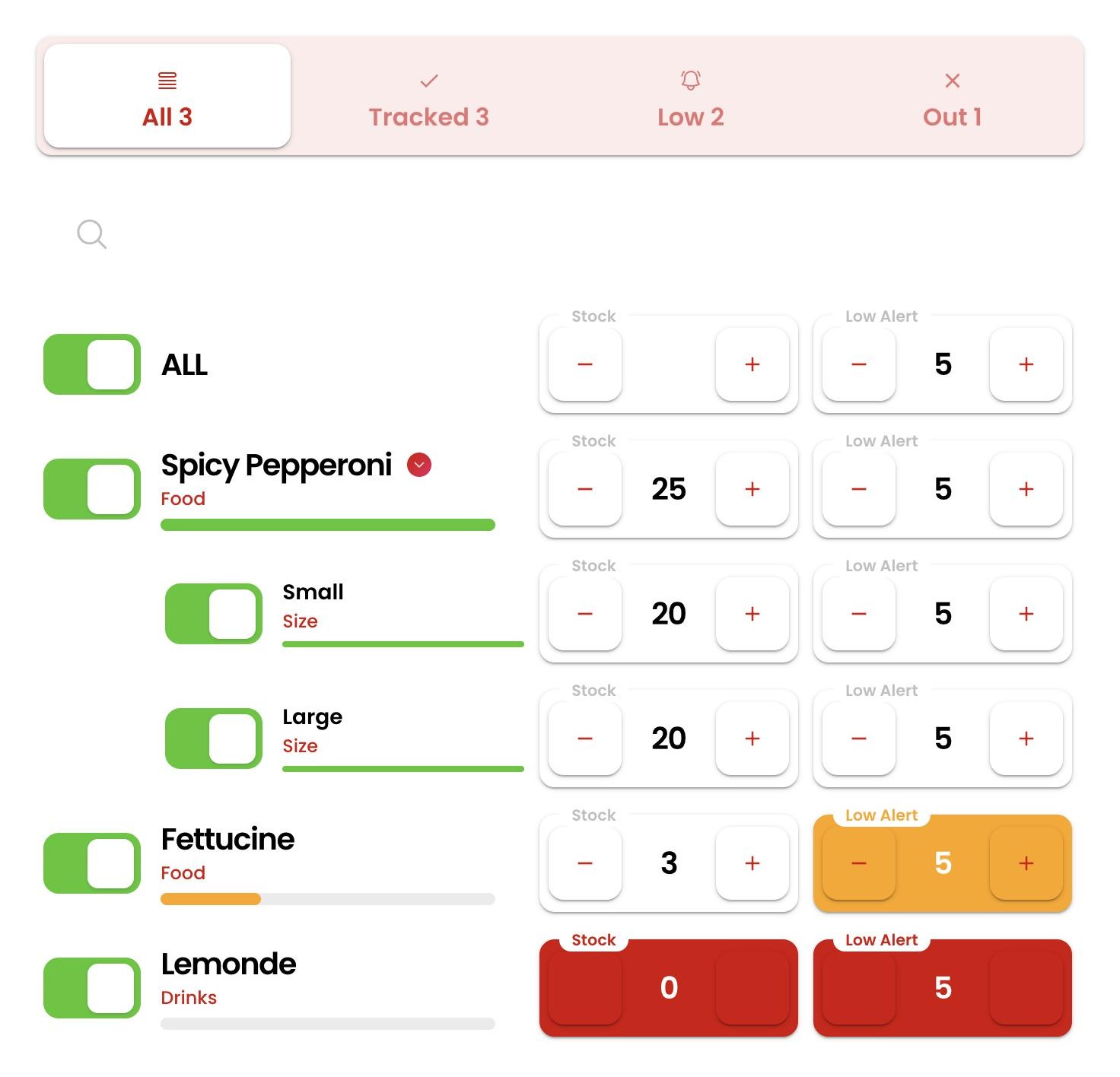
For a small restaurant that wants stock under control without another subscription, Aposal is a free POS with inventory, reports, order management, a kitchen display and QR order-and-pay built in. The free plan also integrates with Loyverse, and Pro adds user management and guest chat.
MarginEdge: best for invoice-heavy kitchens

MarginEdge starts from the invoice. It processes unlimited invoices, keeps recipe costs current, syncs to your accounting and, for U.S. clients, pays the bills. Bars can add the Freepour liquor scale to weigh open bottles. Toast users pay extra fees, covered below.
Restaurant365: best for one back office

Restaurant365 puts inventory, recipes, purchasing, accounting and scheduling on one system, with cost of goods and variance by location or concept. It suits a group that wants the bookkeeper and the chef reading the same numbers. Pricing comes with a quote based on your locations.
A commissary can run its own inventory across locations, so the central kitchen’s transfers show up in each site’s food cost.
Toast xtraCHEF: best for Toast restaurants

If you already run Toast, xtraCHEF is the path of least resistance. Essentials covers invoice automation, accounting sync and food cost analytics. Pro adds recipe costing and inventory management. Both are quoted add-ons to the Toast POS.
Our Toast vs Square comparison covers the wider choice between the two.
Lightspeed: best inventory inside a POS

Lightspeed deducts ingredients in real time as dishes sell, costs recipes as you build them, and sends low-stock alerts and recurring supplier orders. Advanced inventory comes with Essential and above, and as an add-on on Starter.
Setup includes data migration, one-on-one onboarding and an account manager. Our Lightspeed review goes deeper.
Square: best for simple menus

Square Plus tracks inventory at item level, which suits a café selling bottled drinks and pastries. For ingredients, Square Restaurant Inventory, built by MarketMan, adds ingredient tracking, purchase orders and menu costing for Plus and Premium accounts.
TouchBistro: best for existing TouchBistro users

TouchBistro sells inventory management as a quoted back-of-house add-on to its POS. It makes sense if you already run TouchBistro and want one login and one support line. Our TouchBistro review covers the POS itself.
Crunchtime: best for chains

Crunchtime is built for brands with many stores, and says more than 850 restaurant brands use it, including Five Guys and sweetgreen. Managers count by voice, AI forecasts sales to set prep and orders, and dashboards roll up by region. A single café doesn’t need it.
Craftable: best for restaurant groups and hotels

Craftable reads invoices with AI, maps each line to an inventory item and reprices every recipe that uses it. Counts run on any device with barcode scanning, and transfers between bar and kitchen are tracked.
Its menu engineering maps dishes by margin and popularity and lets you test a price or portion change before you make it.
5. POS-built or standalone: which do you need?

A POS-built system costs less and needs no integration. A standalone one works with any POS and goes deeper on invoices, recipes and ordering. The right choice follows your menu more than your budget.
- POS-built fits: a short menu, one site and one person doing the ordering.
- Standalone fits: scratch cooking, several suppliers, more than one site, or a POS you might change.
- Bars: pour cost needs bottle-level counts; our bar POS guide covers the targets.
A standalone system is only as good as its link to your POS. These are the connections each vendor names:
| Software | Works With |
|---|---|
| MarketMan |
Square, Toast, Lightspeed, Clover |
| Aposal |
Built in, plus Loyverse |
| MarginEdge |
Toast, at +10% |
| Toast xtraCHEF |
Toast |
| Lightspeed |
Built in |
| Square Restaurant Inventory |
Square Plus, Premium |
| Craftable |
Toast, Square, NCR Aloha; QuickBooks, Sage |
6. What costs aren’t on the price list?

7. What should you ask in the demo?

- Does it deduct ingredients when a dish sells, or only finished items?
- Is my POS a native integration, and does it carry an extra fee?
- How many invoice scans are included each month, and what does the next one cost?
- What does onboarding cost, and who builds the first recipes?
- Can I export recipes, prices and count history if I leave?
- Is the annual price refundable if it doesn’t work out?
8. How do you set it up without losing a month?

- Clean the item list first: one name and one unit per product, matching your invoices.
- Load 30 days of invoices, so recipe costs start from real prices.
- Cost your 20 best sellers before the rest of the menu.
- Set par levels from two weeks of counts, not from memory.
- Count on the same day, at the same time, with the same person. Our inventory management guide covers the routine.
- Read the variance report weekly and chase the three biggest gaps.
9. The verdict

| Your Restaurant | Pick | Why |
|---|---|---|
| Most independents | MarketMan Starter |
Recipes, counts, POS sync |
| Small, tight budget | Aposal |
Free POS with inventory |
| Invoice-heavy kitchen | MarginEdge |
Unlimited invoices |
| Wants accounting too | R365 |
One back office |
| Already on Toast | Toast xtraCHEF Pro |
Same login |
| Inventory in the POS | Lightspeed Essential |
Advanced inventory incl. |
| Simple menu | Square Plus |
Item inventory |
| On TouchBistro | TouchBistro Inventory |
Add-on to your POS |
| Chain, many stores | Crunchtime |
Forecasts, voice counts |
| Group or hotel | Craftable |
Invoice AI, transfers |
Judge whichever you choose on its first variance report, not the demo. If nobody reads that report on Monday, the software is just a tidier way of losing money.